


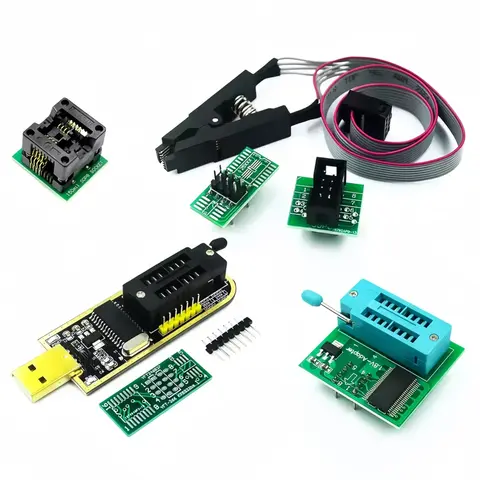
Results for usb blaster

USB Blaster refers to a compact, 10-pin JTAG programming cable used for configuring and debugging CPLD/FPGA devices, particularly in embedded systems and hardware development. It is not related to sandblasting tools or USB flash drives, despite similar-sounding names.
The search term usb blaster primarily reflects technical users’ intent to find a reliable, low-cost JTAG interface cable for programming Altera (now Intel) FPGA and CPLD chips. This includes developers working on embedded systems, hobbyists building custom hardware, and engineers testing NIOS-based processors. The correct interpretation of usb blaster centers on its function as a 10-pin JTAG connection cable that supports a wide range of programmable logic devices, ensuring compatibility with industry-standard development environments like Quartus Prime.
JTAG (Joint Test Action Group)
A standardized protocol used for testing and programming integrated circuits, especially FPGAs and CPLDs. It allows in-circuit debugging, firmware flashing, and boundary-scan testing without requiring physical access to internal circuitry.

CPLD (Complex Programmable Logic Device)
A type of programmable logic device that offers a higher level of integration than simple PLDs, commonly used in control logic and interface circuitry.

FPGA (Field-Programmable Gate Array)
A reconfigurable semiconductor device that can be programmed after manufacturing to perform specific digital functions, widely used in prototyping and production of digital systems.

When selecting a USB Blaster, prioritize the following:
  1. Verify compatibility with your target device (e.g., Altera MAX II, Cyclone series) and development software (Quartus, ModelSim).
  2. Ensure the cable supports USB 2.0 for stable data transfer and reliable programming sessions.
  3. Check for 10-pin connector specifications—some devices require specific pinouts (e.g., 5V vs. 3.3V logic levels).
  4. Look for positive user reviews on durability and plug-and-play functionality, especially for repeated use in lab environments.

Avoid counterfeit or unbranded cables, as they may cause programming failures or damage to sensitive ICs. Opt for trusted brands like GOHJMY, which offer reliable performance and international standard compliance. Always use the correct firmware and drivers when connecting to your PC—many USB Blasters require installation of a specific driver (e.g., USB-Blaster driver from Intel) for proper operation.
For best results, use the USB Blaster in a stable power environment and avoid long cable runs that may introduce signal noise. If you're new to FPGA development, consider starting with a pre-tested kit that includes both the cable and sample projects to reduce setup complexity.
In summary, the usb blaster is a critical tool for developers working with programmable logic devices. Choose a verified, well-reviewed model with clear technical specifications to ensure seamless integration into your workflow.

USB Blaster Mini JTAG Cable for FPGA Programming - AliExpress

What Is a USB Blaster and Why It’s Essential for FPGA and CPLD Development


A USB Blaster is a compact, high-performance JTAG programmer designed for configuring and debugging complex programmable logic devices such as CPLDs (Complex Programmable Logic Devices) and FPGAs (Field-Programmable Gate Arrays). It serves as a bridge between your computer and development boards, enabling reliable firmware uploads, real-time debugging, and in-system programming. Whether you're an electronics hobbyist, engineer, or embedded systems developer, a USB Blaster ensures fast, error-free programming with full compatibility across Altera (now Intel) devices.
JTAG (Joint Test Action Group)
A standardized protocol used for testing and programming integrated circuits, especially in embedded systems. It allows for boundary scan testing and in-circuit programming without requiring physical access to every pin.

FPGA (Field-Programmable Gate Array)
A type of integrated circuit that can be programmed after manufacturing to perform specific logic functions. FPGAs are widely used in digital signal processing, communications, and high-speed computing.

CPLD (Complex Programmable Logic Device)
A smaller, simpler alternative to FPGAs, CPLDs are ideal for control logic and simple interfacing tasks. They offer faster performance for smaller designs and are easier to implement in basic applications.

Understanding the Search Intent Behind “USB Blaster”


When users search for “USB Blaster,” they are typically looking for a reliable, plug-and-play JTAG programming tool compatible with FPGA and CPLD development. The search intent centers around hardware compatibility, ease of use, and technical performance—especially for developers working with Altera/Intel devices like the MAX II, Cyclone, or Arria series. The top results often include USB-to-JTAG cables, programmer modules, and accessories that support real-time debugging and configuration.
This demand reflects a growing need for affordable, high-efficiency tools in DIY electronics, academic labs, and industrial prototyping. A well-designed USB Blaster not only reduces programming errors but also accelerates the development cycle by enabling quick firmware updates and on-the-fly debugging.

Key Features and Technical Specifications to Consider


When selecting a USB Blaster, focus on the following parameters to ensure optimal performance and compatibility:
  • Interface: Must support USB 2.0 for reliable data transfer speeds.
  • Compatibility: Confirm support for your target device (e.g., Altera MAX V, Cyclone IV).
  • Pin Configuration: 10-pin JTAG connector is standard for most FPGA/CPLD boards.
  • Power Supply: Should be bus-powered via USB (no external power required).
  • Driver Support: Look for drivers compatible with Windows, macOS, and Linux.

Comparing Top USB Blaster Options on AliExpress


Below is a detailed comparison of three top-performing products matching the “USB Blaster” keyword:
Feature GOHJMY USB Blaster (10-Pin JTAG) JASTER Crystal USB Flash Drive JLSBM Sand Blaster Nozzle (Misleading Title)
Product Type USB JTAG Programmer USB Flash Drive (16GB–64GB) Sandblaster Nozzle (Metalworking Accessory)
Interface 10-Pin JTAG (USB 2.0) USB 2.0 (Standard) N/A (Mechanical Part)
Compatibility Altera/Intel FPGA/CPLD Devices Any USB-Host Device Sandblasting Machines (e.g., for metal finishing)
Power Source USB Bus-Powered USB Bus-Powered Compressed Air (Not Electrical)
Material High-Density Plastic & Copper Crystal-Encased Plastic Boron Carbide (High Wear Resistance)
Use Case FPGA Programming & Debugging Data Storage & File Transfer Surface Preparation (e.g., metal, glass)

> ⚠️ Note: The JASTER and JLSBM listings are not related to USB Blasters. The JASTER product is a flash drive, and the JLSBM item is a sandblasting nozzle—both are unrelated to JTAG programming. Always verify product type before purchasing.

Real-World Use Case: Programming a Cyclone IV FPGA Board


Problem: You're developing a digital signal processing module using a Cyclone IV FPGA board but can't upload your design due to a failed JTAG connection.
Solution: Use a genuine USB Blaster to reprogram the device.
  1. Verify Hardware Compatibility – Confirm your FPGA board uses a 10-pin JTAG header and is supported by the USB Blaster (e.g., GOHJMY model).
  2. Install Drivers – Download and install the official Intel Quartus Prime software, which includes the necessary USB Blaster drivers for Windows and Linux.
  3. Connect the USB Blaster – Plug the 10-pin JTAG cable into the FPGA board’s JTAG port and the USB end into your computer.
  4. Open Quartus Prime – Launch the software, load your project, and select “Programmer” from the Tools menu.
  5. Configure the Programmer – Choose “USB-Blaster” as the programming device and ensure the correct device is selected in the list.
  6. Start Programming – Click “Start” to flash your design. Monitor the progress bar and verify successful completion.
  7. Test the Device – Power cycle the board and verify the FPGA executes the expected logic.

Recommended Best Practices and Avoiding Common Pitfalls


- ✅ Always use a genuine USB Blaster with verified compatibility—avoid counterfeit or unbranded devices that may cause programming failures.
- ✅ Use short, high-quality JTAG cables to prevent signal degradation, especially for high-speed designs.
- ❌ Do not use USB hubs or extension cables—direct USB connection ensures stable communication.
- ✅ Regularly update your Quartus Prime software and USB Blaster drivers to maintain compatibility with new FPGA models.
- ✅ If your board has a reset button, press it before programming to ensure a clean start.

Final Recommendation


For developers working with FPGA and CPLD devices, the GOHJMY 1PCS USB Blaster Mini USB Cable (10-Pin JTAG) is the most reliable choice. It offers full compatibility with Altera/Intel devices, supports USB 2.0 speeds, and is designed for seamless integration with Quartus Prime. Avoid confusion with unrelated products like flash drives or sandblasting nozzles—always double-check the product description and use case before purchase.
Investing in a quality USB Blaster saves time, reduces errors, and ensures your projects move from concept to execution smoothly and efficiently.

Aliexpress